We remain fully operational. Our teams are working around the clock to ensure your deliveries continue safely.

DOWNLOAD THE APP


Copyright © 2025 Desertcart Holdings Limited
DOWNLOAD THE APP


Buy anything from 5,000+ international stores. One checkout price. No surprise fees. Join 2M+ shoppers on Desertcart.
Desertcart purchases this item on your behalf and handles shipping, customs, and support to Antigua and Barbuda.
🚀 Elevate your home network — speed, security, and sharing in one sleek package!
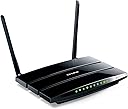
The TP-Link N600 TL-WDR3600 is a dual-band wireless router delivering combined speeds up to 600Mbps with simultaneous 2.4GHz and 5GHz bands. Equipped with full Gigabit Ethernet ports and two USB ports, it supports high-speed wired connections and easy sharing of printers and media. Its one-touch WPS button ensures quick, secure network setup, while detachable antennas offer enhanced signal strength and upgrade flexibility. Ideal for millennial professionals seeking reliable, fast, and secure home networking without overpaying for unnecessary features.
| ASIN | B008RV51EE |
| Antenna Location | Home |
| Antenna Type | Fixed |
| Best Sellers Rank | #207,999 in Computers & Accessories ( See Top 100 in Computers & Accessories ) #3,902 in Computer Routers |
| Brand | TP-Link |
| Built-In Media | 2 Usb Port, 2. |
| Color | Black |
| Compatible Devices | Printer |
| Connectivity Protocol | Wi-Fi |
| Connectivity Technology | wireless |
| Control Method | Voice |
| Controller Type | Voice Control |
| Coverage | Provides strong wireless signal coverage in immediate vicinity with potential for wider coverage depending on environmental factors |
| Customer Reviews | 4.0 4.0 out of 5 stars (1,043) |
| Data Transfer Rate | 600 Megabits Per Second |
| Frequency | 2.4 GHz |
| Frequency Band Class | Single-Band |
| Global Trade Identification Number | 00845973070007, 06935364070014 |
| Has Internet Connectivity | Yes |
| Has Security Updates | Yes |
| Is Modem Compatible | No |
| Item Weight | 0.96 Pounds |
| LAN Port Bandwidth | 10/100/1000 (Gigabit) |
| Manufacturer | TP-Link IP Cams |
| Maximum Upstream Data Transfer Rate | 600 Megabits Per Second |
| Mfr Part Number | FBA_TL-WDR3600 |
| Model Name | TL-WDR3600 |
| Model Number | TL-WDR3600 |
| Number of Antennas | 2 |
| Number of Ports | 2 |
| Operating System | Windows, Mac |
| Other Special Features of the Product | WPS |
| Router Firewall Security Level | High |
| Router Network Type | dual-band |
| Security Protocol | WPA2 |
| UPC | 803982793492 845973070007 059180863172 112040014944 |
| Warranty Description | 2 year |
| Wireless Compability | 802.11n |
L**R
Buy this router!!!
I am not an incredibly tech-savvy person, so I won't get into all the technical details of this router. But I can say definitively that it works AWESOMELY for me. It was pretty quick and easy to set up--very clear directions both in the package and in the wizard that came with it on the setup disk. I was previously using a four-year-old $25 Belkin N150 router which simply couldn't handle the high amount of WiFi interference in my apartment complex from so many routers in close proximity. Switching channels did nothing and I was virtually unable to use my internet about 80% of the time. Fed up, I decided to upgrade. I picked this router for its dual-channel capability, good online reviews, and relatively low price point for its power. As soon as I had installed and connected via a 5GHz connection, the change was amazing. I have had NO buffering issues when streaming video and no dropped connection problems anywhere in my apartment. My link score on inSSIDer went from 38 on my old router to 100 (out of 100). The router interface is a little opaque for the non-tech-savvy, but I like that there are more options than on the very dumbed-down Belkin interface. If you live in an apartment dwelling or anywhere with a lot of signal interference, a dual-band router is definitely the way to go. There is a lot less interference on the 5GHz channels and you'll be able to power through the noise this way even during peak usage times. A note--I considered upgrading to an AC router over this N router. AC routers are still pretty expensive, and although I have devices that will support an AC connection, the N is more than fast enough for the internet connection that I have. Don't overpay if you aren't doing anything crazy over your internet connection--it's probably not worth it.
V**Y
This is a really nice dual band router...!
I bought this router, due to the fact the price was very reasonable, especially with all the little functionality built-in to it. * Wireless Dual Band * Gigabit ports * two USB ports for printers, hard drives, et cetera First off, I had no trouble getting this working with my broadband I had recently install a few days prior. Nice easy setup, and nice GUI interface to configure the router the way you want it. I am still looking to do some more tweaking on it, but not a rush. Just remember, you may want to "clone" it to your broadband router or PC which is the original piece of equipment, configured to your broadband account. I have had this for about a month or just under a month, and it is really running great! It does not get very hot to the touch neither! I have used both bands of wireless for this device, but I have noticed, that if you have an older piece of equipment, it does not seem to recognize the 5.0 GHz band. My cell phone recognizes it, but my laptop, Xbox, and PS3 do not. My cell phone is only a couple months old, while the rest of my devices are easily, 2 years old each. So, the 5.0 GHz looks to be a great option if you have very to pretty new equipment to recognize this wireless broadband. This makes me happy that I did not get the upgraded router to this one, which does the 450 MB wireless connectivity for 5.0 GHz. This particular model does the 300 MB wireless 5.0 GHz, and I suggest this one if your wireless equipment is more than 3 to 6 months old currently. I have not used the USB ports yet, but have used the 2.4 GHz wireless connection for laptop, PS3, and a wireless laser printer, and works totally fine. I have hard wired my desktop, Internet phone, satellite, and Xbox 360 to the Gigabit ports, and these babies are FLOWING and MOVING... without any trouble, and not getting and issue with multiple devices using wireless & hard wired ports. So, this product is very good for the money, just note that your current equipment may not see the 5.0 GHz, due to the age of your equipment in use. You'll have to check your equipment manuals to verify if it handles the 5.0 GHz wireless. Hope this helps a bit. Regards.
P**N
We recently upgraded to a 120MBits/sec internet package so the home network required upgrading to gigabit speed to match. Our network requires both wired and wireless capability so I had to confirm that the 4 LAN ports are all gigabit, this one is. It couldn't be easier to install. Just access the internal URL and follow the easy step by step guide. I used the same encryption key, encryption protocol and subnet IPs as the old router so I was pleasantly surprised that the new router scanned for devices on the network and automatically connected them ! Guest internet is a nice bonus as is the concurrent 2.4 Ghz and 5 Ghz connectivity. I use 2.4 for guest and 5 for the home network, 802.11n only for 5Ghz for greatest security. Built-in print server (connect the printer directly to the routers USB port) requires installation of a small app on every computer connected to the router but it works well once up and running. There is a 2nd USB port that can be used for a network hard drive. If ease of installation and features at a great price are what you're looking for, you can't go wrong with the WDR3600.
L**H
Very good product
G**O
Buenas prestaciones para el precio que tiene. No quería gastar demasiado en un router neutro, pero necesitaba una velocidad de transmisión de datos decente. Éste cumple perfectamente, gracias a sus tomas gigabit ethernet y su wifi a 600mbps. El rango del wifi es mejor que el de mi anterior router, un TL-3420 v2 de TP-Link también. Repito con TP-Link, aunque la interfaz web no me gusta nada (he de confesar que pocas me dan las opciones que necesito), por lo que lo primero que he hecho según lo he tenido en mis manos, ha sido meterle OpenWRT con LuCi. Eso es otro mundo.
J**O
Funciona muy bien y es estable, tenemos 3 moviles 2 portatiles 1 sobremesa y no se cuelga nunca va muy bien.
E**L
This arrived in a rather large box and I was surprised to find that the only thing inside was this router. I read the directions and started to hook it up at 3:00 PM. The physical hookup was easy but then the problem started. I could not get it to work properly even when hooked directly by ethernet cable. I then called the Support number and was greeted by a pleasant lady who spoke Chinese much better than she spoke English. Both frustrated by a language barrier, she emailed me the link to an updated firmware. The one supplied with the router was out of date. When I finally got to download the firmware upgrade I installed it on the router. Then, and only then, was I able to get the router working. It was now 10:30 PM. A total of 7 1/2 hours before I got it working! Since the installation the router has been working well. As well as the Cisco router it replaced. For the price, and without the installation problems, it isn't a bad router.
Trustpilot
2 weeks ago
3 weeks ago